---
title: "How to Change or Update my profile details?"
url: "https://credentiauat.productfruits.help/en/article/how-to-change-or-update-my-profile-details"
language: "en"
last_updated: "2026-04-23T13:21:34.820Z"
---
# How to Change or Update my profile details?
To Change/Update my Current address and Phone number.
Explore the following video to learn how to modify or update your profile and demographic details:
It's important to keep your profile details correct and up-to-date in the Credentia Platform to ensure trouble-free onboarding of your exams and accurate certificate generation.
| **Note**:
*Make sure to check/update your profile details before scheduling your exam or while applying for the renewal of your certificate.* |
| --- |
In the manage profile section, you have options to correct or update your profile details, including your current address, phone number, and gender details. If you need to update your demographic details like name, date of birth, or Social Security Number (SSN) you must submit a correction form. See [here](https://help.credentia.com/en/article/how-to-submit-a-correction-form-before-scheduling-my-exam) for more info.
To update your email address, reach out to Credentia Support at [support@credentia.com](mailto:support@credentia.com)
Following are the steps to change your address or phone number:
### Step 1: Log in to the Credentia Platform.
> *Visit the* [*credentia.com*](https://credentia.com/) *website, navigate to the* [*login page*](https://cna365.examroom.ai/login/) *provided on the site, and* enter your registered email address and password to log in.
### Step 2: Navigate to the “Edit Profile” or “Manage Profile” section
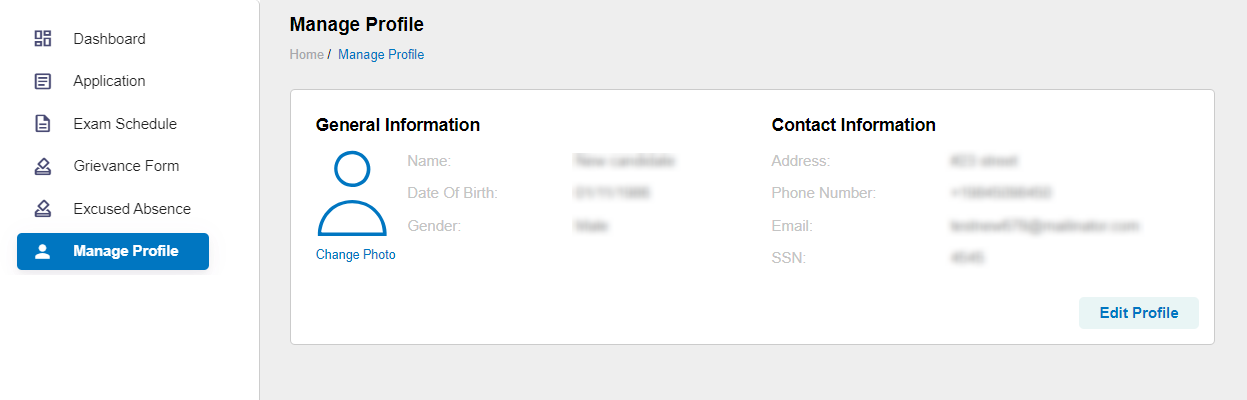
> Click on the "**Profile Icon**" at the top right side of the screen and select "**Edit Profile**" to navigate to the Manage Profile section.
>
> You can also access the “**Manage Profile**” from the side menu.
>
> 
### Step 3: Select the "Edit profile" button
> Click on the “**Edit Profile button”** provided on the **manage profile page**.
### Step 4: Edit/update the required profile details
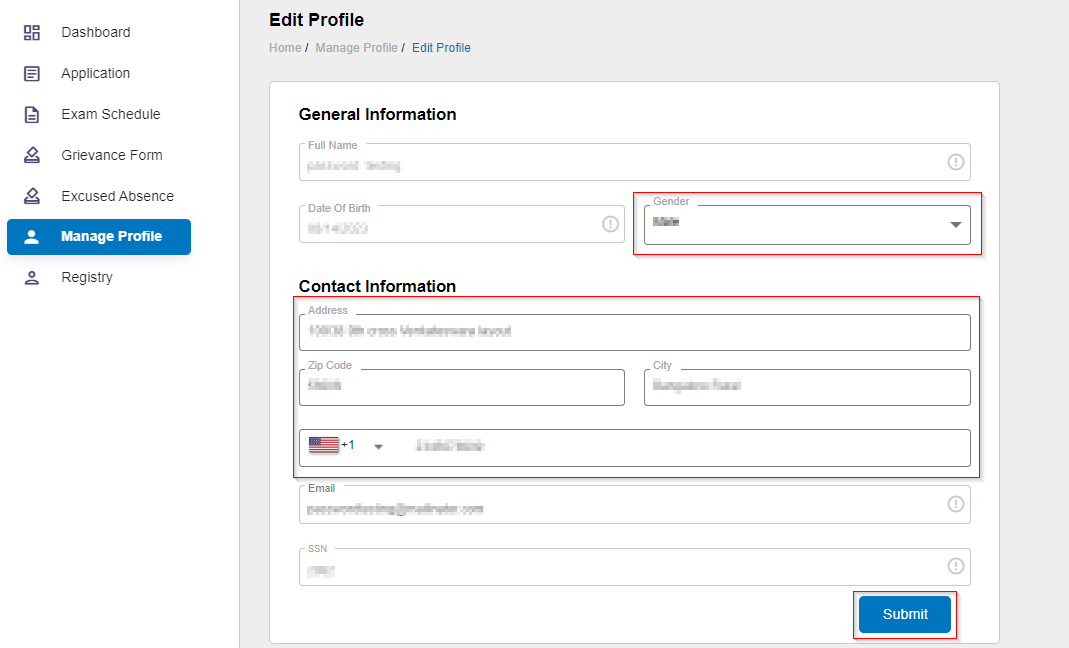
> Under contact information, you have the option to change/update your gender, current address, and Phone number.
### Step 5: Select the “submit button”
> Click on the “**Submit button**” to save and update the changes you have made.
>
> 
| **Note**:
*If you need to update your **name**, **date of birth**, or **Social Security Number (SSN)**, See* [*here*](https://help.credentia.com/en/article/how-to-submit-a-correction-form-before-scheduling-my-exam) *for more info.* |
| --- |